
Calendar
The calendar in Kibi Connect coordinates appointments, shifts and deadlines for the entire company — in sync on smartphone, tablet and desktop, visible per team, site or project.
The calendar keeps appointments, recurring routines and operational planning visible in one shared place.
Teams can coordinate faster because they immediately see what is scheduled and what overlaps.
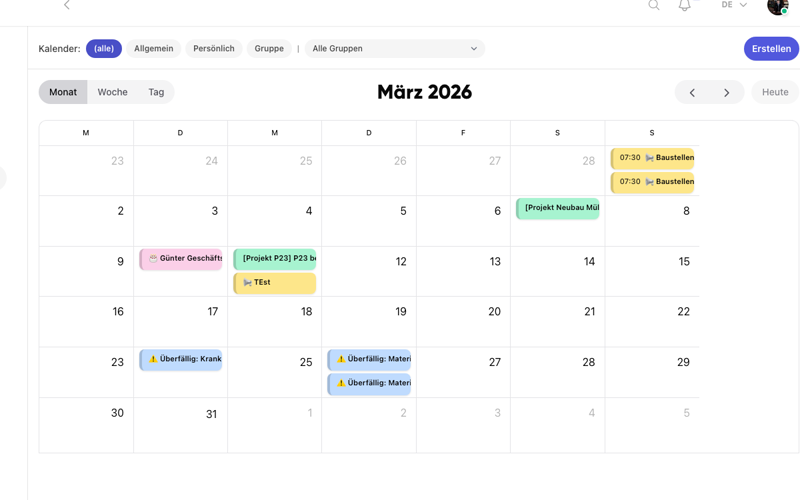
Create appointments quickly
Set up meetings, shift events and recurring appointments in a few steps.
- Add operational appointments centrally
- Keep recurring routines visible
- Reduce coordination effort across teams
Uit de praktijk
In operational day-to-day, teams often have five calendars in parallel — the private one on the phone, the shift plan on the wall, an Excel sheet with the foreman, Outlook in the office, and a WhatsApp chain somewhere. Bringing that together creates more calm than any meeting optimisation.
Veelgestelde vragen
Veelgestelde vragen over Calendar in Kibi Connect
How do I plan shifts and deployments for teams without a PC?
Appointments, shifts and deployments are created centrally and appear directly in the Kibi Connect app on the smartphone. Employees see their assignments without needing Outlook or a separate shift planning tool. Recurring events like regular team meetings or routine inspections can be set up once and continued automatically.
Can I make appointments visible only to specific groups or teams?
Yes. Appointments can be added company-wide, team-specific or project-related. Employees only see what is relevant to them — without being overloaded by other teams' meetings or shifts at other sites.
Are appointments also available on the go and offline?
Yes. The calendar view is fully mobile-optimised and remains accessible after synchronisation even offline. Employees can check their next appointments in locations with weak reception, for example in a basement or on a remote construction site.
How does the calendar connect with groups and projects?
Every group in Kibi Connect has its own calendar. Project meetings, delivery dates or shift handovers appear directly in the context of that group. Appointments stay connected to the related chats, files and tasks instead of sitting in a separate calendar silo.
Kibi Connect gratis uitproberen
Ervaar Calendar direct in de app en ontdek hoe Kibi Connect in uw bedrijf kan worden ingezet.