
Which calendars do I see and how do I show or hide them?
Updated Reading time: 1 min
On this page
In the calendar view, multiple calendars are combined. Using the sidebar, you can show or hide individual calendars with checkboxes—so you see exactly the information you need.
My Calendars#
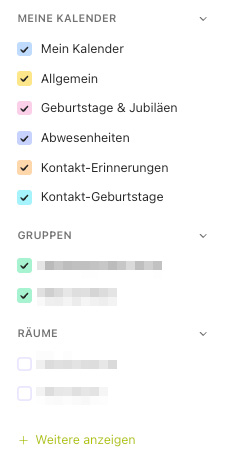
Under My Calendars, you control the following entries:
-
My Calendar
Your personal appointments.
-
General
Appointments that apply to everyone in the company.
-
Birthdays & Anniversaries
Birthdays and anniversaries of colleagues.
-
Absences
Vacation, flex days, and other absences.
-
Contact Reminders
Reminders for your contacts.
-
Contact Birthdays
Birthdays of your contacts.
Group, Room, and Shared Calendars#
Under Groups, you show or hide the calendars of your groups; under Rooms, the occupancy of individual rooms; and under Shared Calendars, the shared calendars of colleagues.
Info
Showing or hiding only changes your own view—the appointments themselves remain unchanged.