
How do I filter and sort the colleague directory?
Updated Reading time: 1 min
In the colleague directory, you can not only find people using the search function, but you can also sort the list, filter it, and adjust the displayed columns.
Sort by columns#
Click on a column header (e.g., Name, Position, or Department) to sort the list by that column. Another click reverses the order.
Filter the directory#
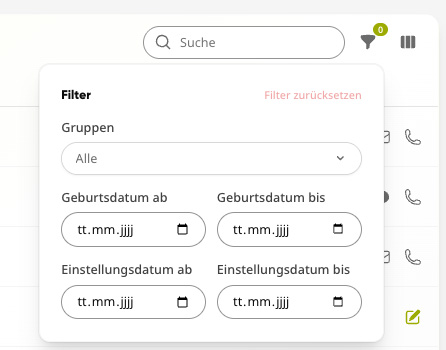
Use the Filter icon in the top right to narrow down the list:
-
Groups
Display only people from a specific group.
-
Birthday (from–to)
Limit by birth date within a period.
-
Hiring date (from–to)
Limit by entry date within a period.
Use Reset filters to clear all filters.
Show or hide columns#
Use the Columns icon in the top right to determine which information is displayed as columns—for example, Department, Location, Landline/Mobile (work), Phone/Email (private), Birthday, or Hiring date.
Info
Sorting, filters, and columns only affect your own view.