
Kai
Updated Reading time: 3 min
Kai is the AI assistant of Kibi Connect. You can ask him questions about your knowledge on the platform, have documents created, and get information about your day in the morning. Kai only finds what you are allowed to see yourself. If his results are sparse, outdated, just a draft, or contradictory, he will tell you openly and indicate where you can verify.
New since October 2026#
Agents & Skills – Agents and Skills are now in a shared tab. You create Skills in the Skill Studio, and Kai helps you with the formulation.
Results from third-party systems – If Kai creates a quote in a connected system like your ERP, you can find it under Results in the Third-party systems filter and open it directly there.
Setting up Kai for on the go – In the new Mobile tab of the Kai settings, you set your location and the agents in the car and see what Kai can do on the Apple Watch.
Locations, addresses, and municipalities – Kai tells you where something is located in Germany, Austria, and Switzerland, what is nearby, and what characterizes a municipality.
Kai finds images – Kai describes photos and images from files, Wiki, posts, photo archives, and chats and finds them again when asked. Upon request, he lists the photos of a day from a group or an album.
Administration "Knowledge" – Company context, learning status, knowledge gaps, and exclusions in one place.
Daily briefing – In the morning, a brief overview of your appointments, tasks, and messages.
Office documents with Kai – Word documents, tables, and presentations in one step, in your company's design.
Image generation in the EU – Generated images are now created in the EU. Which services we use is listed in the list of subprocessors.
Kai on the web – Kai searches the web and reads public websites, cites the sources, and asks before making changes. Admins can disable both.
Kibi Kumpel – Ask Kai on the small Kibi Kumpel and record voice notes: hold the KAI button, speak, done. Actions like Arrive and Leave are only executed by the Kumpel after your confirmation.
Agents & Skills#
Skills are reusable instructions for Kai, for example, "Always respond in the formal 'Sie' form." Agents work independently on a task, with their own role and rules. You can find both in the Kai section under the Agents & Skills tab: agents at the top, your Skill library below. Use New Skill to create your own Skill there.
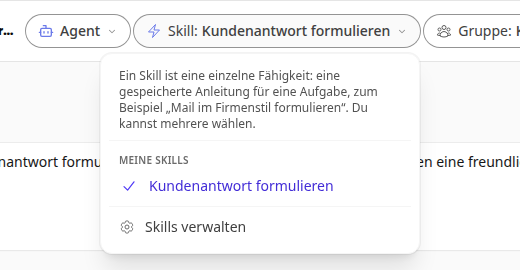
In a conversation, you activate Skills via the Skill button at the top of the conversation, and an Agent via the Agent button. In the Skill menu, your own Skills are listed under My Skills, and the shared Skills of others are under From the organization. Manage Skills takes you back to the Agents & Skills tab.
Further pages about Kai#
Info
Kai is a module of the platform. Admins determine which roles can use Kai in the role editor. Usage is billed via your company's Kai credit.
Kai
- Kai: Create documents from templates Kai creates Word documents for you from your templates and selectively supplements existing documents. Kai can also create completely new documents without a…
- Kai: Fill out PDF forms Kai fills out PDF forms with real form fields for you, such as leave requests, checklists, or inspection protocols, and saves the result as a new file.
- Kibi Kumpel: Kai and Voice Notes The Kibi Kumpel is a small wearable device with a display and speaker. You hold down the KAI button and speak. Kibi Connect turns this into a note, answers y…
- When do I start a new conversation with Kai? Kai reads the previous course of a conversation with every response. The longer a conversation becomes, the more Kai Credits each individual response costs,…
- How does Kai create and edit Office documents? Kai creates and edits Word documents, spreadsheets, and presentations for you. You specify what you need, and you see the changes directly in the document.
- How does Kai find pictures? Kai now also learns from images. It describes photos and images stored on the platform and can retrieve them when you ask, such as “Show me the photo of the…
- How does Kai's daily briefing work? At the start of your workday, Kai sends you a brief overview of your day. It appears under Kai as a separate conversation titled "Daily Briefing" wit…
- How do I control Kai's knowledge in Administration? In the Knowledge section, as an admin, you can see what Kai knows about your company, what it is currently learning, and where knowledge is missing. You also…
- How does Kai search the web? Kai can retrieve public information from the internet: Kai searches the web and reads public websites. This allows Kai to answer questions that require curre…
- Where are the images that Kai generates created? Kai can generate images upon request. Here you can see how to create an image, where to find it later, and where it is created.
- How do I create my own Kai agents? An agent works independently like a person: with its own role, task, and rules. To do this, it uses skills. If you select an agent in a conversation, you spe…
- Where can I find Kai's results? In the Results tab, you can see everything Kai has created or edited for you in your conversations. For example, you can find a task or an offer in the ERP w…
- How do I look up places, addresses, and municipalities with Kai? Kai answers your questions about places, addresses, and municipalities in Germany, Austria, and Switzerland: where something is located, what is nearby, and…
- How do I set up Kai for on the go? In the Mobile tab of the Kai settings, you specify whether Kai is allowed to use your location and which agents appear for you in the car. It also shows what…
- How do I create my own skills for Kai? With a skill, you give Kai a fixed instruction, for example, a response style or a process. You write it once and enable it in any conversation where you nee…
- How do I create a construction diary with Kai? Kai designs the daily report of a construction site from tasks, notes, and the construction site group's chat. Upon request, the working hours of the da…