
Who can see which wiki pages? (Permissions)
Updated Reading time: 2 min
On this page
By default, a wiki page is public, meaning it is visible to all employees on your platform. You can restrict a page to selected groups via visibility settings.
Info
As a Wiki Creator, you set the visibility for pages you are responsible for. The system administration can also do this for pages belonging to other people. For all other pages, the Page Settings button will be missing.
Set visibility#
Open the page and click Edit. If it's a new page, you're already in the editor.
Click on Page Settings at the top.
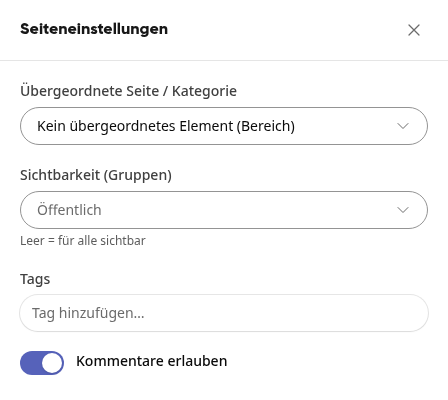
Click on the Visibility (Groups) field and select one or more groups. Use Search for group... to find a group faster.
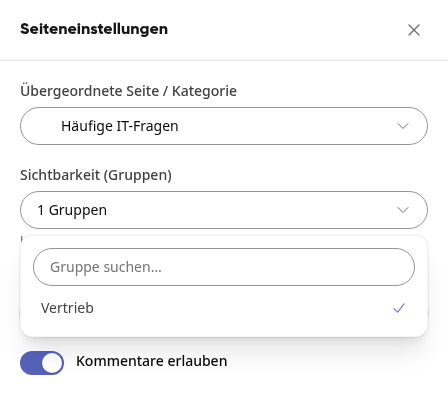
Close the page settings. Your selection takes effect immediately; there is no save button here.
If you want to make a page public again, deselect all groups in the same field. The field will then show Public again.
Info
As a Wiki Creator, you can only select groups of which you are a member. The system administration sees all groups.
Who can see a restricted page#
Members of the selected groups see the page normally.
The responsible person sees the page even without being a member of the group.
All other employees cannot find the page in the page tree or search. Even with a direct link, they cannot see the content.
Guests only see pages in the wiki that are assigned to one of their groups. This allows you to selectively release individual content to them. Public pages remain invisible to them.
Warnung
Subpages do not inherit the restriction. A subpage without its own group remains public: although it does not appear in the page tree if the parent page is hidden, it can still be opened via search and a direct link. Therefore, set confidential content individually on each page.
Tipp
As a Wiki Creator, you cannot delete a page that is linked to a group. Delete Wiki Page only appears in the menu once you have deselected the groups.