
How do I enable comments?
Updated Reading time: 2 min
On wiki pages, readers can leave questions or additions. Comments are already enabled for new pages, and you can turn them off and on individually for each page.
Info
With the Wiki Creator role, you can change this setting on your own pages. If you are editing someone else's page and do not see Page settings, contact the person responsible for Kibi Connect.
Enable or disable comments#
Open the page and click on Edit (or create a new page).
Click on Page settings.
Toggle the switch Allow comments. The setting takes effect immediately, you don't need to click Publish for it.
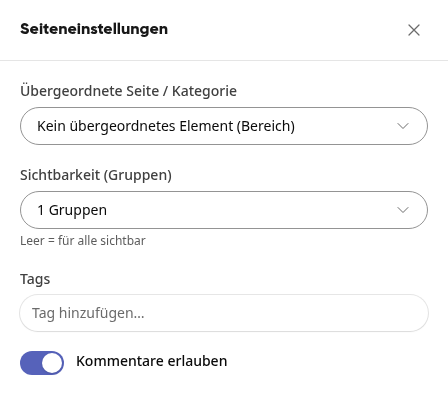
Close the page settings and click on Finish editing.
Comments on the page#
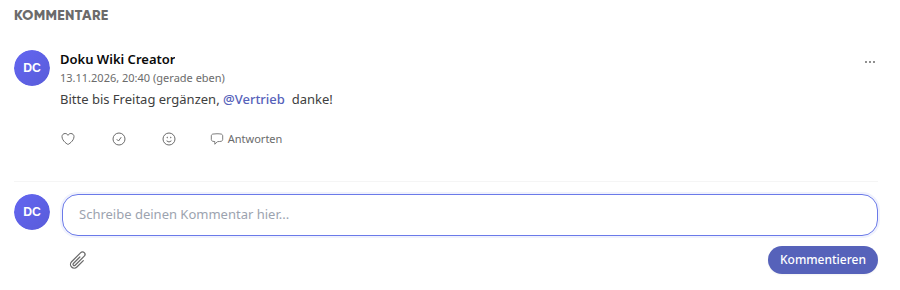
If comments are enabled, the Comments section appears below the content. There, everyone who can see the page writes a text and clicks on Comment. To reply to an existing comment, use Reply.
Info
If the switch is off, the entire section disappears, and no one can comment on this page. Existing comments are retained and reappear as soon as you turn the switch on. While you are editing a page, the section is hidden.
Mention an entire group in a comment#
If the page is shared with one or more groups (Page settings → Visibility (groups)), you can mention one of these groups in a comment. All members of the group will then receive a notification.
Type @ in the comment field followed by the first letters of the group name.
Select the group from the list. You can recognize it by the note Notify all members.
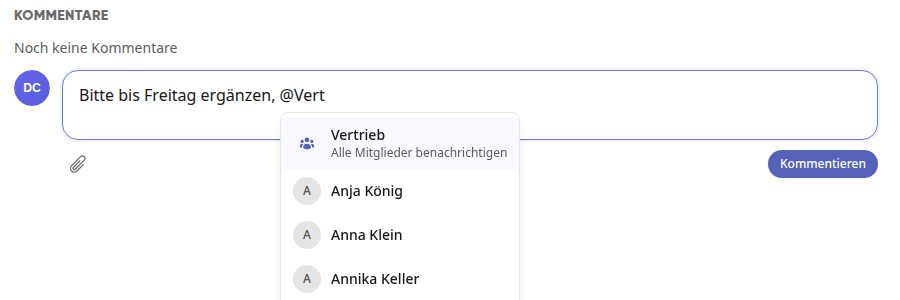
Click on Comment.
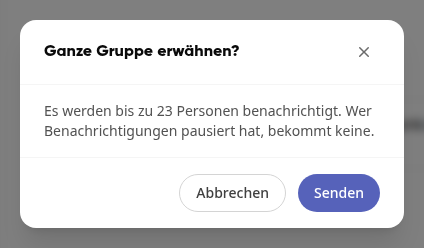
Confirm in the window Mention entire group? with Send. The window shows how many people will be notified at most.
Info
Only groups for which the page is shared and in which you are yourself a member are offered. If a page is visible to everyone, no group is available for selection. Groups with more than 30 members can only be mentioned by their group admins.
Tip
Anyone who has paused their notifications will not receive any even when a group is mentioned. Each person is only notified once, even if you also mention them individually.