
How do I manage my chats?
2min
To keep your chat list clear, you can clear a chat history, remove a chat from your list, or leave a group. All these functions can be found in the menu in the header of the opened chat.
Edit and manage chats
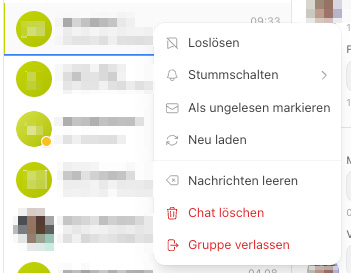
Open the desired conversation in the Chat module.
Right-click on the chat you want to edit.
Select the desired action.
Mark as unread
Right-click on the chat you want to mark as unread.
Select Mark as unread and the chat will be displayed as a new message.
Delete chat history / Clear messages
With Clear messages, you remove all previous messages from a conversation – but only from your own view. The conversation itself remains, and you can continue to write and receive messages.
How to delete chat history:
Open the chat menu (see above).
Select Clear messages.
When is this useful?
If you want to clean up a long conversation but keep the contact.
If older messages are no longer relevant to you.
The history is cleared exclusively for you. Your conversation partner still sees all previous messages. Deleted messages cannot be restored.
Delete chat
With Delete chat, you remove the entire conversation from your chat list. Your conversation partner retains their copy of the conversation.
How to delete a chat:
Open the chat menu (see above).
Select Delete chat.
Confirm the security prompt.
When is this useful?
If you no longer need a conversation and want to keep your list clear.
What you should note:
The chat is only removed for you – not for your counterpart.
If the other person writes to you again, the conversation will reappear in your list – with the new messages.
A "message to myself" is completely removed when deleted.
Difference at a glance: Delete chat history only clears the messages and keeps the conversation. Delete chat removes the entire conversation from your list.
Leave group
You can leave a group chat you no longer need with Leave group. After that, you will no longer receive new messages from this group.
How to leave a group:
Open the group chat and access the chat menu.
Select Leave group.
Confirm the security prompt.
When is this useful?
If a topic or project is completed for you.
If you accidentally joined a group or the messages are not relevant to you.
What you should note:
The owner of a group cannot leave it.
If you want to rejoin later, an administrator of the group must add you again.