
How is the interface structured?
Updated Reading time: 1 min
After logging in, you will land on your homepage. The interface of Kibi Connect is always structured the same way, so you can quickly find your way around.
The most important areas at a glance#
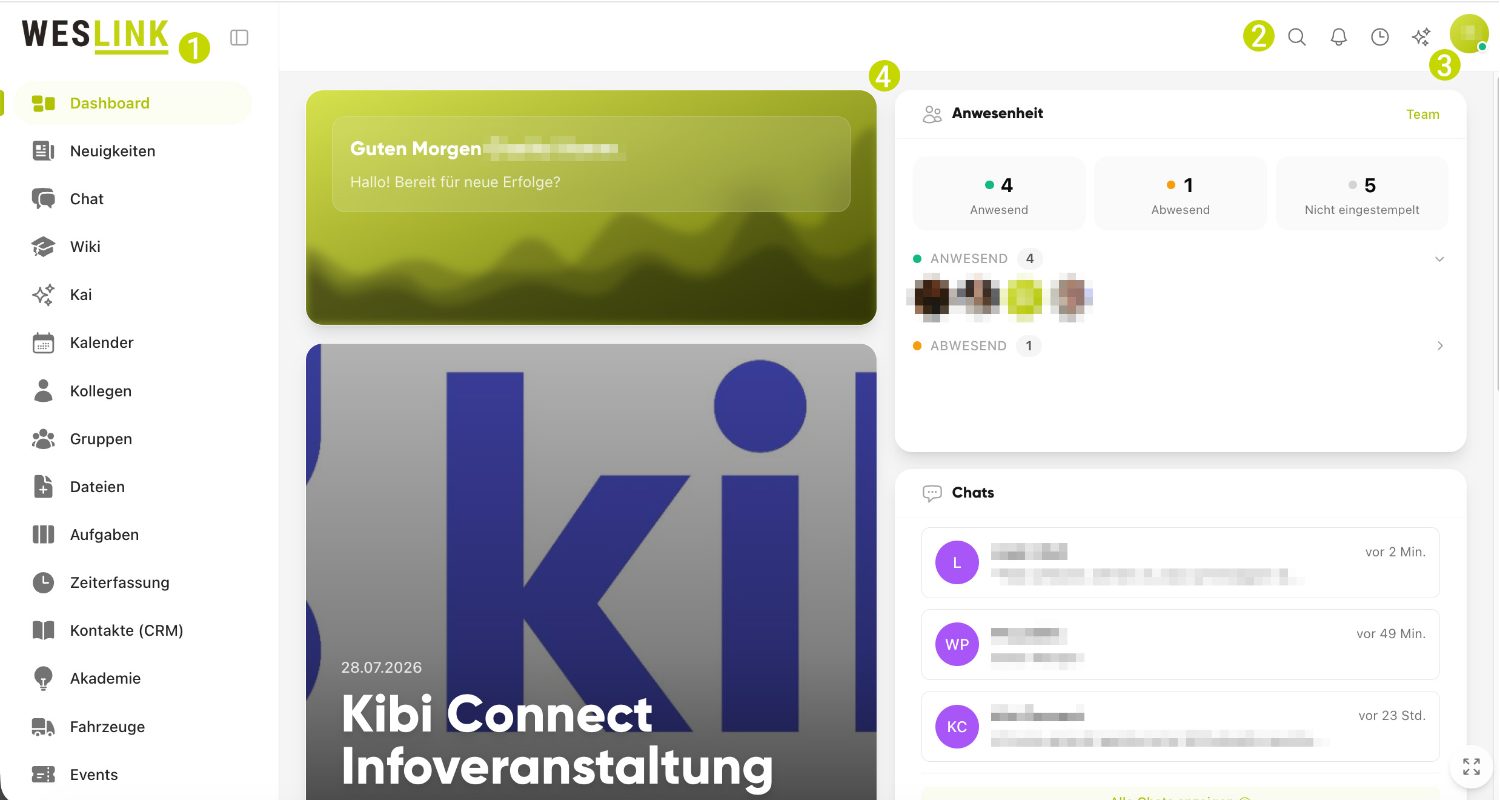
Sidebar (left): Via the sidebar, you can access all enabled areas such as News, Wiki, Chat, Calendar, Files, Colleagues, and Groups. Use "Collapse sidebar" to create more space if needed.
Search: Using the search ("Search for anything..."), you can quickly find posts, wiki articles, files, colleagues, and more.
My Account (top right): Here you can open your profile, notification settings, and log out via "Log out".
Homepage / Dashboard: On the dashboard, you can see the most important information for you at a glance.
Favorites: You can mark frequently used content with "Add to favorites" and find it again more quickly later.
Tipp
Which areas you see in the sidebar depends on which modules are activated and enabled for you in your company. If you are missing an area, contact the responsible person in your company.