
Events
Updated Reading time: 1 min
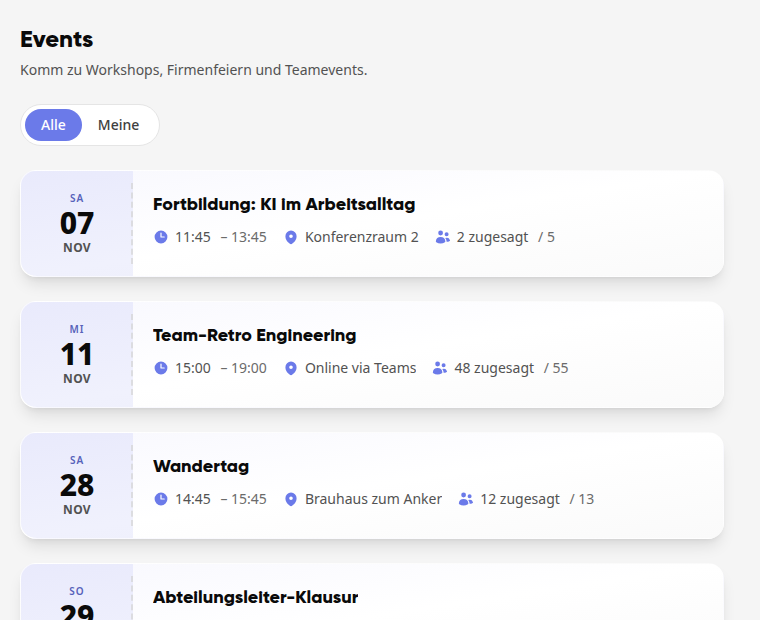
In the Events module, you will find workshops, company parties, and team events from your company and can confirm your attendance with a single click. All employees see the events that have been released for them; new events are typically created by employees with the News Creator role. Whoever organizes an event plans the program, provides materials, writes to participants, manages the guests, checks them in at the entrance, and afterwards sends a recap with photos.
Instructions#
See also
Events
- How do I view events and RSVP? In the Events module, you can see which workshops, company parties, and team events are coming up, and you can let the organization know whether you will be…
- How do I create an event and manage the guests? You create an event, decide who can participate, and keep track of who is coming: colleagues as well as external guests.
- How do I plan the program for an event? You define the schedule for your event: agenda items with start and end times, room, image, relevant documents and links, and for multi-day events, individua…
- How do I file documents for an event? You provide participants with directions, slides, or handouts directly at the event and specify per file who can see them and from when. What only the organi…
- How do I write to the participants of an event? You send a message to the participants of your event, immediately or at a scheduled time, for example the reminder the day before. You choose who receives it…
- How do I check in guests at an event? At the entrance, you record who actually arrived: by scanning a guest's QR code or by clicking in the list of participants. Both paths end up in the sam…
- How do I send a recap with photos to the participants? After an event, you send a few closing words to all attendees along with the photos and documents. Participants can also find the recap afterwards on the eve…