
How do I restore deleted photos from the Recycle Bin?
Updated Reading time: 2 min
On this page
Photos and videos that you delete are not gone immediately: they remain in the Trash of the Photos & Videos module for 30 days. During this time, you can restore them with a click or delete them permanently.
Moving photos and videos to the trash#
You delete photos and videos in an album. This action is not available in the Stream.
Open the album. Right-click on the photo or video and select Delete. For multiple items, first click Select at the top, mark them, and then click Delete at the bottom.
Select Delete everywhere. The photo or video disappears from the archive and from all albums.
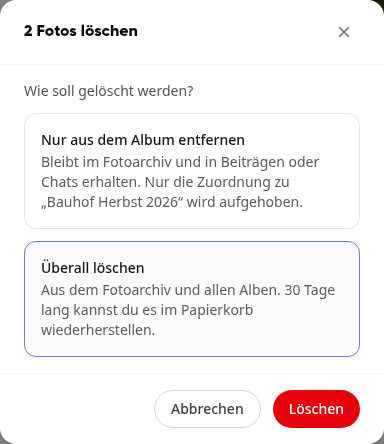
Click Delete.
You will receive a message that the photos are now in the trash. Videos are counted as well.
Info
You can only move photos and videos to the trash that you have uploaded yourself. Photos from posts, chats, or other sources are only removed from the album; you can delete them at their source. Remove from album only leaves the photo or video in the archive, which is why it does not end up in the trash.
Restore photo or video#
In the navigation, open Photos & Videos and click on Trash on the left. For each entry, you can see when it was deleted and how many days it will remain here.
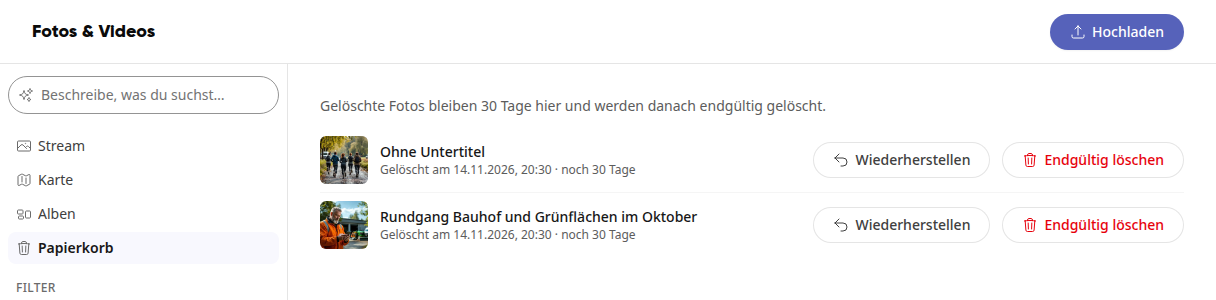
Click on Restore for the desired entry.
The photo or video is back in the archive and also in the albums where it was previously located.
Permanently delete photo or video#
Click on Delete permanently for the entry in the Trash.
Confirm once again in the dialog with Delete permanently.
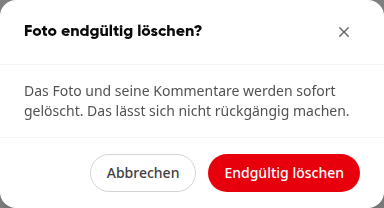
The photo or video and its comments are deleted immediately.
Warning
You cannot retrieve anything that has been permanently deleted. This also applies to anything that has been in the trash for more than 30 days: it is automatically deleted permanently.
Info
The Photos & Videos module is available to all employees. In the trash, you will see the photos and videos that you have uploaded and deleted yourself.