
How do I ask Kai about customers, sales opportunities, and company groups in the CRM?
Updated Reading time: 2 min
Kai knows your CRM. In normal conversation, you can ask about a customer's history, open sales opportunities, a company's corporate group, and who is connected to it. Upon your request, Kai also records relationships and corporate groups.
Info
This feature is available to everyone who is allowed to use Kai and the CRM. Kai only sees the contacts and companies that you are permitted to view in the CRM yourself.
Ask Kai about a customer#
Open Kai in the navigation and click on New conversation.
Write your question with the name of the company or contact and send it, for example: "What's new at Rheinstahl Präzisionstechnik AG? Show me the customer history, open opportunities, the company group, and who is related to it."
Kai responds with an overview from the CRM.
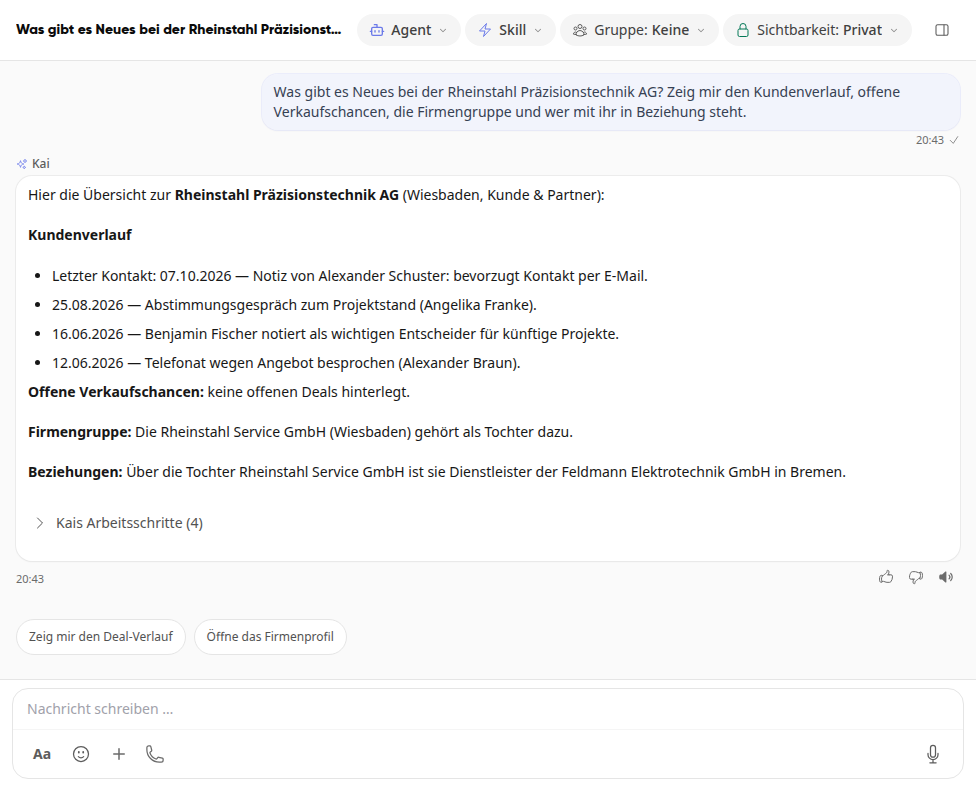
Below the response, Kai suggests suitable follow-up questions, for example Open the company profile. Clicking on it asks the question directly.
What Kai answers#
Topic | What Kai tells you |
|---|---|
Customer history | Master data, tags, last contact and the most recent conversations, calls, visits, emails, notes and logs with date and person |
Sales opportunities | Open, won and lost sales opportunities of a company or person and their stage in the pipeline |
Company group | Which parent company a company belongs to and which subsidiaries belong to it |
Relationships | Who is related to a company or contact, for example as a dealer, planner or service provider, optionally for the entire company group |
If Kai cannot find a company or contact, Kai will tell you so. This means: The entry is not in the CRM, or you are not allowed to see it. Kai does not invent entries.
Have relationships and company groups entered#
Tell Kai in the conversation what should be entered, for example: "Rheinstahl Service GmbH belongs to the company group of Rheinstahl Präzisionstechnik AG. Please enter that in the CRM." Or: "Rheinstahl Service GmbH is a service provider for Feldmann Elektrotechnik GmbH."
Kai searches for both entries in the CRM and prepares the change. If the card Kai wants to change something in Kibi appears below the answer, check what Kai describes and click on Yes, execute. With Discard everything remains as it is.
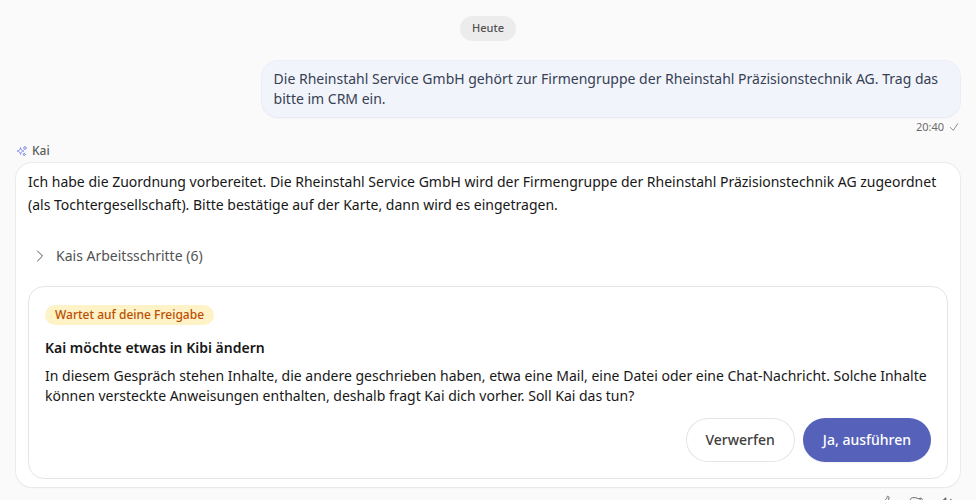
The card then shows Completed. The relationship or company group is now in the CRM and Kai will mention it the next time you ask about this company.
Important
Kai can only enter what you are allowed to change yourself in the CRM. For a company group, you must be allowed to edit the company that is being assigned; for a relationship, at least one of the two entries. Employees are generally allowed to edit the entries they created themselves.
Tip
Create the company or contact in the CRM beforehand. Kai only links entries that already exist there.