
Own modules
Updated Reading time: 2 min
On this page
Under Own Modules you will find applications that your company has built itself for the platform, for example an idea box. You open them directly in Kibi Connect as soon as the administration has released your role for them.
What custom modules can do#
Custom modules store their data on the platform and, if desired, also work with other areas of Kibi Connect. Depending on the module, they can, for example:
Select and contact groups: You select a group, and the module sends an email to its members.
Book rooms and vehicles: The module shows your bookings and creates new ones.
Read absences: The module only sees approved absences and never their reason.
Read visits: The module shows registered visits.
Create contribution drafts: The module writes a draft for the news. You must publish it yourself.
A module never achieves more than the person currently using it is allowed to do.
Info
A module only accesses Kibi data once the administration has approved it. This is done by people who are allowed to manage integrations, such as system admins.
Grant access to Kibi data#
Open the module in the Module Studio: Administration, under Platform the entry Modules, tab Own, then the module.
Click on More actions in the top right corner and then on Kibi data. You will see which areas the module requests.
Click on Edit access.
Set the checkmarks for everything the module should be allowed to access. If an area should only apply to some people, open Only for specific people there.
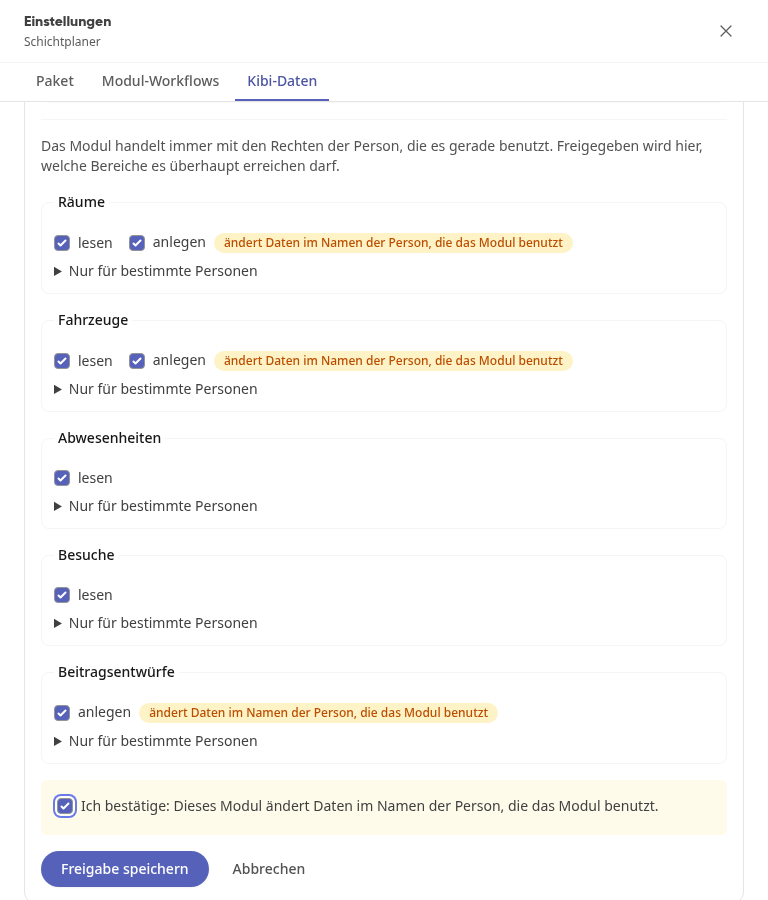
If the module changes data, confirm this below with the checkmark.
Click on Save access.
Warning
If the module is changed after access has been granted, the access may be paused. Then every access to Kibi data will fail until you click on Confirm access again.
What else the administration determines#
In a module's settings, you determine without code which people, roles, and groups it works with, for example, to whom the defect reporter sends its reports. You also decide whether a module may send emails to addresses outside the platform.
Menu Links#
In addition to custom modules, your menu can also contain links to websites, such as a site map or a booking portal. Depending on the settings, they open either within the platform or in a new tab.
Instructions#
Own modules
- How do I open my own module? Custom modules are applications that your company has built itself for the platform. You open them like any other module and work directly in Kibi Connect.
- How do I open an installed application? Installed applications are web applications that your administration has integrated into Kibi Connect from the module catalog, for example a site map of the…
- How do I open a menu link in Kibi? A menu link takes you directly from the menu to a website, for example to a site plan, a booking portal, or a form from your company. If the Open in Kibi opt…
- How do I set the settings of my own module? Many of your own modules offer settings that you can change without code: text, numbers, switches, dropdown lists, colors, and also people, roles, or groups.…
- How does a custom module send emails and PDFs? Custom modules can pass on results: generate a report as a PDF, download it, attach it to an entry, or send it via email. For example: In the defect reporter…