
Kibi Buddy
Updated Reading time: 1 min
The Kibi Kumpel is a small companion for everyone who does not work at a desk. It is clipped to work clothing: hold the button, speak, release. This creates notes and tasks, employees record arrivals and departures, book time on projects, ask Kai, or send short messages to their own group.
Employees use the Kumpel with their own permissions. The HR Manager and System Admin roles manage the company's Kumpels under Kibi Devices.
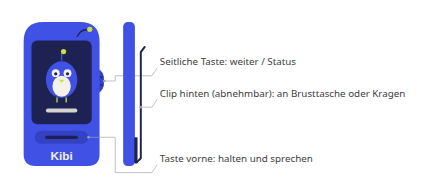
Instructions#
Help#
The Kumpel is dark and not responding#
Usually it is not broken, just asleep. Press the front button or the side button on the right once briefly. It wakes up and displays something again.
If it stays dark, the battery was probably empty. Let it charge via USB-C cable for 10 to 15 minutes and then press a button again.
If it remains dark, it is turned off. Use a paperclip to press once briefly into the small hole on the left side (on/off button). Do not press twice in quick succession, as this will turn it off again. Do not hold it down for long.
A turned-off Kumpel remains off even when connected to the USB-C cable; the cable only charges it.
If it still does not start, contact support.
Kibi Buddy
- Manage buddy The buddy is a small companion that your employees wear on their work clothes: hold the button, speak, release. Kibi Connect takes care of the rest. As an ad…
- Release and use buddy Your company gives you a Kumpel? Here's how to connect it to your account and how to operate it.
- Pair via code or QR If your Kumpel is connected to Wi-Fi but not yet linked to an account, it will display a code and a QR code. Use these to pair it with your account via your…