
How do I look up places, addresses, and municipalities with Kai?
Updated Reading time: 2 min
On this page
Kai answers your questions about places, addresses, and municipalities in Germany, Austria, and Switzerland: where something is located, what is nearby, and what defines a municipality. For this, Kai uses public sources, not your company's data.
Info
This feature is available to everyone who is permitted to use Kai.
Ask a question#
Open Kai in the navigation and click on New conversation.
Write your question and send it. Kai will state the source and the data status in the answer.
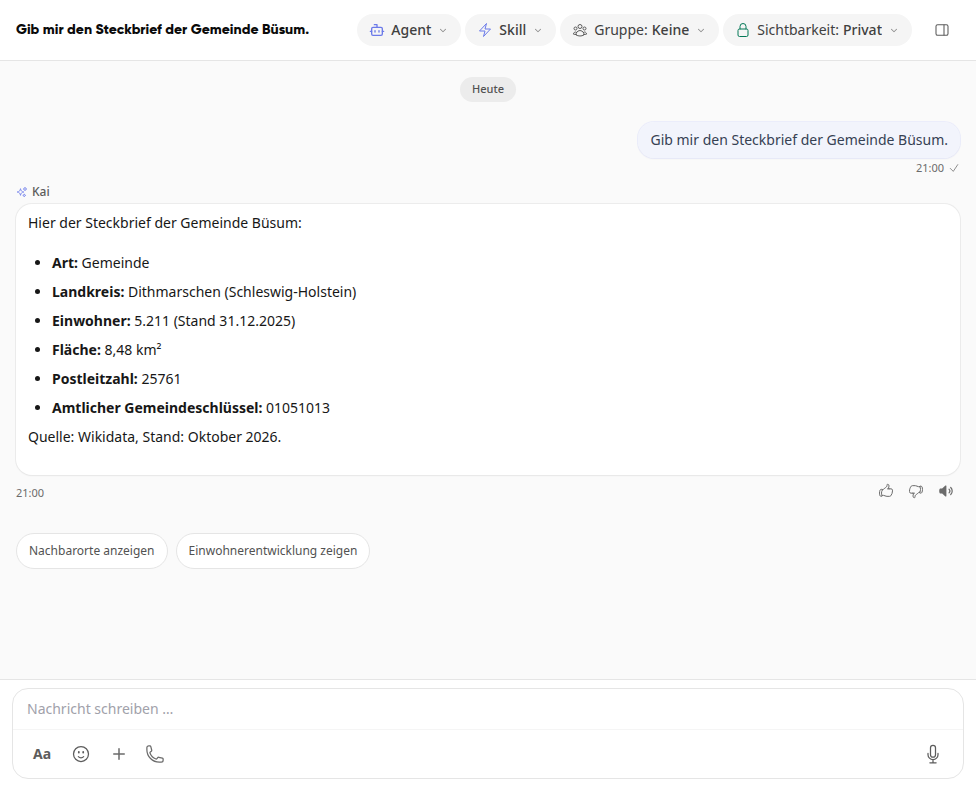
Below the answer, Kai suggests suitable follow-up questions, for example Show neighboring places. Clicking on it asks the question directly.
For example, you can ask:
Municipality: "Give me the profile of the municipality of Büsum."
Place or address: "Where is Maria Veen?"
Places in an area: "Which pharmacy is there in Büsum?"
Near you: "Where is the nearest pharmacy near me?"
Tip
If Kai answers a question about a municipality only from general knowledge and without a source, explicitly ask for the profile of the municipality. Then Kai reads the population, district, area, postal code and municipality key with the data status from the location data.
Important
Result lists can be incomplete because Kai only finds what is in the public map data. If a place is missing from the answer, that does not mean it does not exist. Profiles for municipalities are currently only available for Germany.
Find places near you#
If Kai doesn't have your location, he will ask where you are. Simply tell him a place or an address.
If you want Kai to use your location himself, grant him access once:
In Kai, click the gear icon (Open settings) next to New conversation.
Switch to the Mobile tab.
In the Location section, turn on the Location for operational data switch and allow the location when your device asks for it.
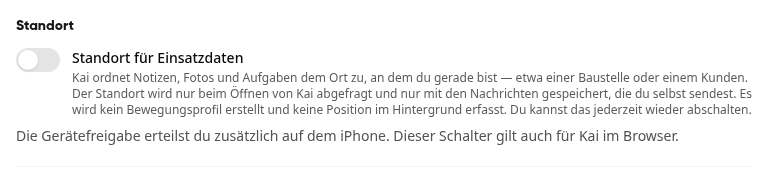
You must also grant permission on the iPhone. The switch also applies to Kai in the browser. You can turn this off again at any time. Kai does not create a movement profile and does not record any position in the background.
Info
If the Location section shows "Your company must first enable the location function." instead of the switch, your company has not activated the location function. System admins configure this in the administration under AI & Workflows in the Settings of Kai, in the Location section. For new companies, Location for operational data is enabled by default, while Location for time tracking remains off. Without your own consent, no location is recorded in any case.