
How do I set up a mailbox?
Updated Reading time: 1 min
On this page
You create a mailbox for employees or groups so that they can read and write emails directly in the platform.
Info
This function is available to system administration. You can find it under Administration → System → Mail. You need at least one active domain for this.
Create mailbox#
Open the Mailboxes tab and click on Create mailbox.
Under Local part, enter the part of the email address before the @ symbol, for example firstname.lastname.
Under Owner type, select whether the mailbox belongs to a Person or a Group.
Select the person or group.
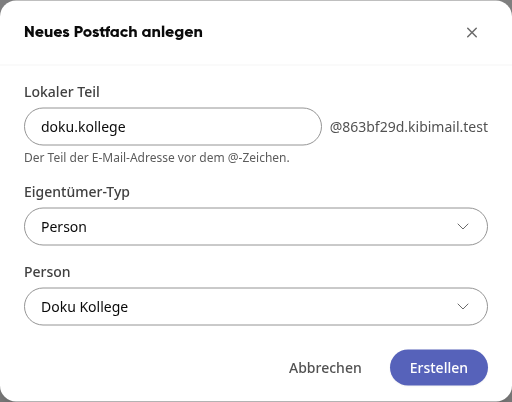
Click on Create.
The message The mailbox has been successfully created. appears, and the mailbox is listed with the status Active.

Info
Personal mailboxes count toward your quota. You can see how many are still available on the General tab under Personal mailboxes. Group mailboxes are included without limit.
Manage mailbox#
Click on … in a mailbox row to open the menu.
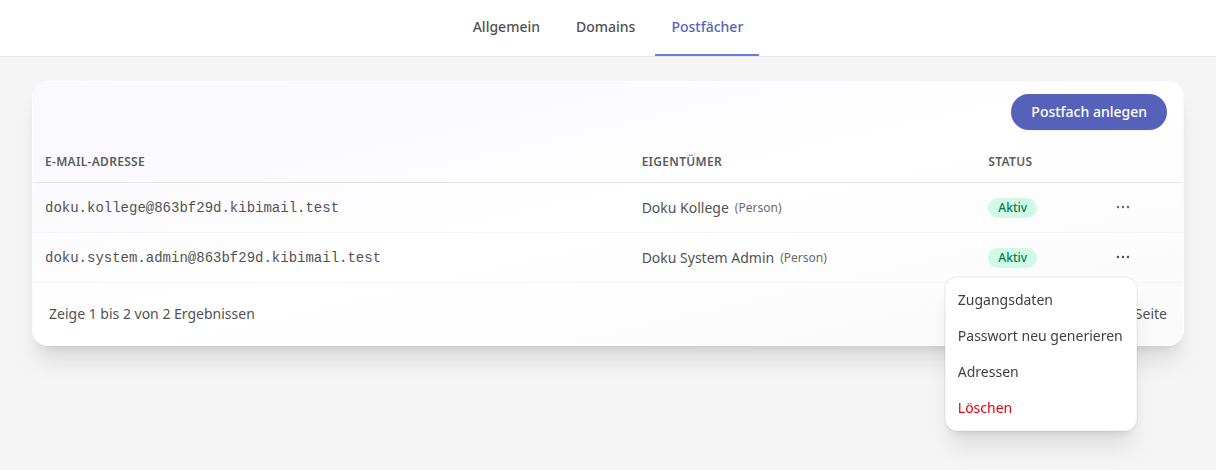
Access data displays the email address, password, and data for IMAP and SMTP servers.
Regenerate password creates a new password. The previous password becomes invalid.
Addresses adds additional email addresses for this mailbox.
Delete removes the mailbox.
Warnung
Deleting a mailbox cannot be undone.