
What happens to my shifts when I call in sick?
Updated Reading time: 2 min
If you fall ill, you report yourself sick directly in the duty schedule. Your upcoming shifts in this period will then be freed up, the planning team will be informed that you are unavailable, and colleagues can take over the slots.
Info
The button Report sick is available in the duty schedule when you have upcoming shifts and your platform uses time tracking. The sick report is an absence in time tracking.
Report sick#
Click on Schedule in the navigation.
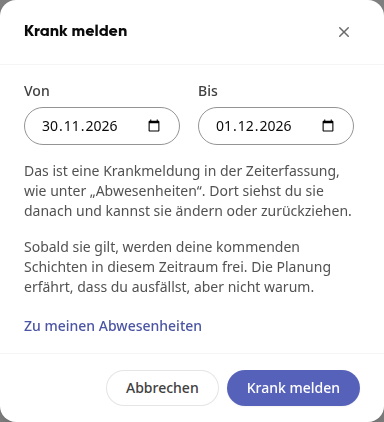
Click on Report sick at the top right.
Under From and To, select the first and last day you are sick. Both are set to today by default.
Click on Report sick.
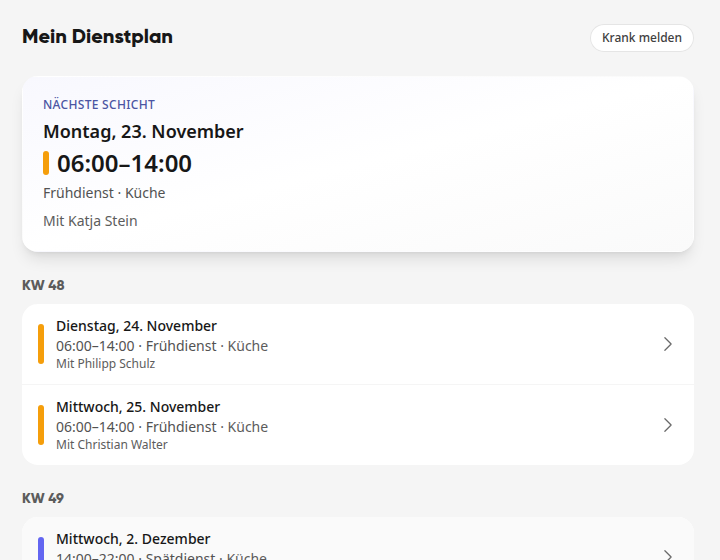
At the top, "Sick report saved. Get well soon!" appears. The shifts in this period are no longer listed under My schedule.
What happens to your shifts#
Your shifts are released. Any shift in the period that has not yet started will lose you as the assigned person. Half days remain unaffected.
The planning team is notified. Whoever plans the area receives a notification like "Doku colleague is out · Kitchen" with the shifts that are now open. The planning team does not learn the reason.
Colleagues can step in. The open slots appear for everyone in the area under Up for grabs as "Still looking for someone".
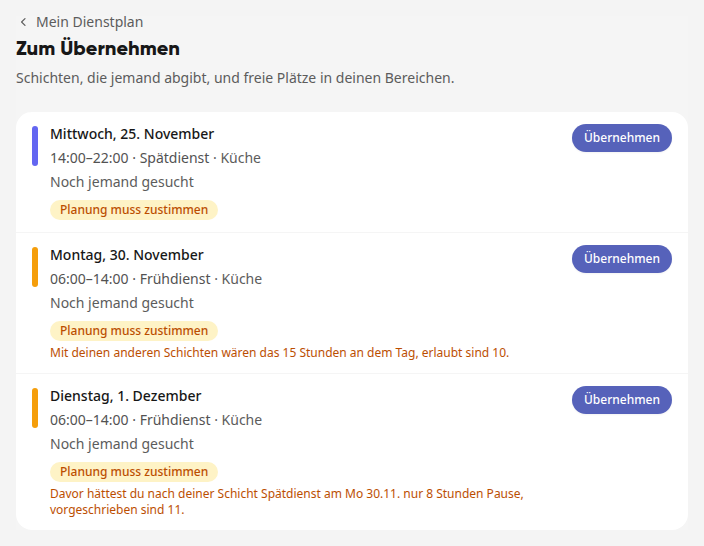
Open offers and requests are cleaned up. If you are currently offering one of the shifts, the offer is closed ("Closed due to absence."). If you wanted to take over an offered shift yourself on those days, it goes back to the Up for grabs list; requests for open slots on those days are closed.
Important
If a sick note must be approved on your platform, the shifts are only released once it is approved.
Change or withdraw a sick note#
You can find the sick note in time tracking under Absences. In the Report sick window, Go to my absences takes you directly there. There you can change the period or withdraw the sick note.
Warning
If you recover earlier, you will not automatically get the freed-up shifts back. Talk to the scheduling team or take over an available slot under To take over.
Tip
A sick note that you enter directly in time tracking under Absences also frees up your shifts.